
Glances
25.0k 1.4kWhat is Glances ?
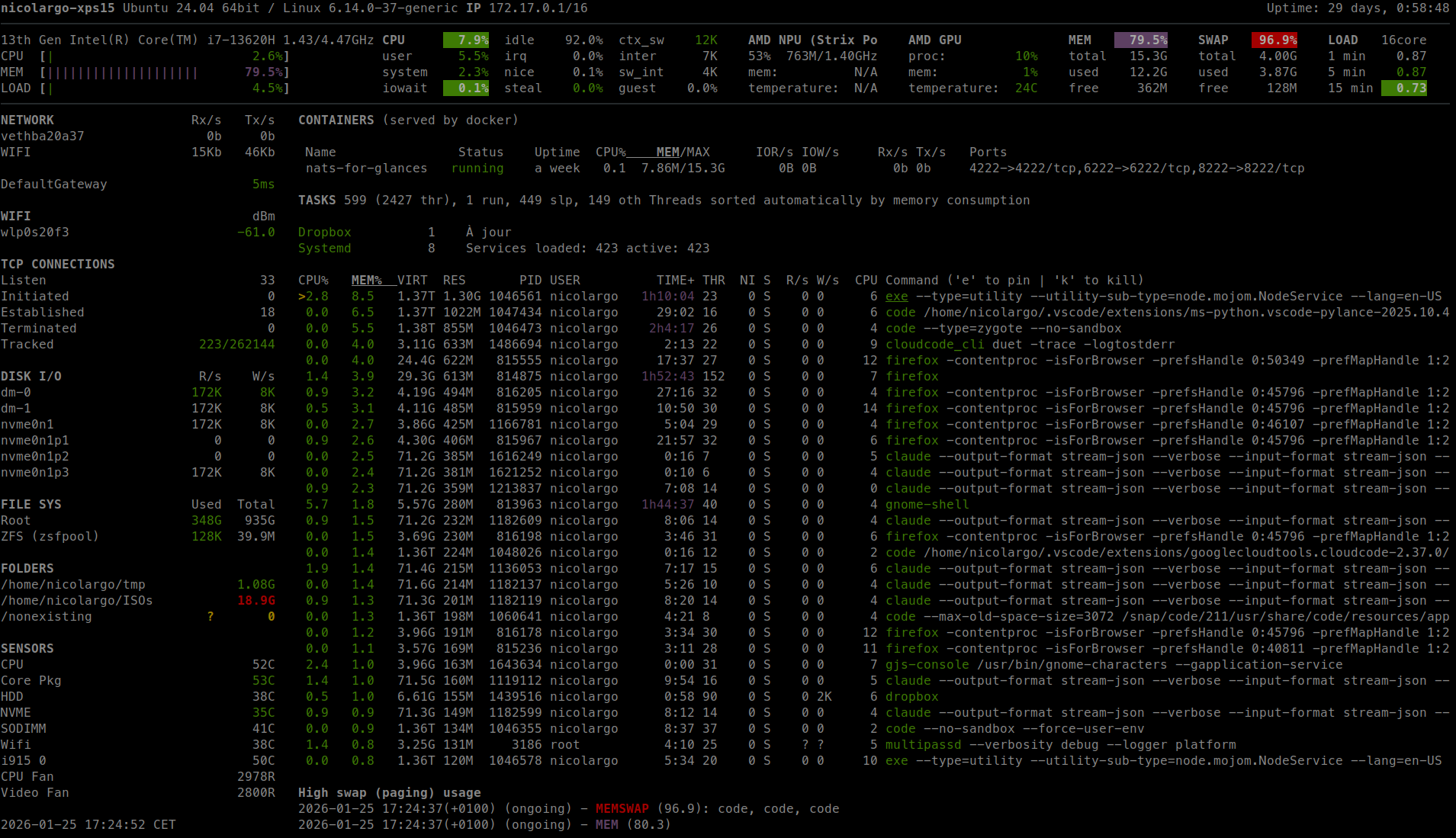
Glances is an open-source system cross-platform monitoring tool. It allows real-time monitoring of various aspects of your system such as CPU, memory, disk, network usage etc. It also allows monitoring of running processes, logged in users, temperatures, voltages, fan speeds etc. It also supports container monitoring, it supports different container management systems such as Docker, LXC. The information is presented in an easy to read dashboard and can also be used for remote monitoring of systems via a web interface or command line interface. It is easy to install and use and can be customized to show only the information that you are interested in.
How it works ?
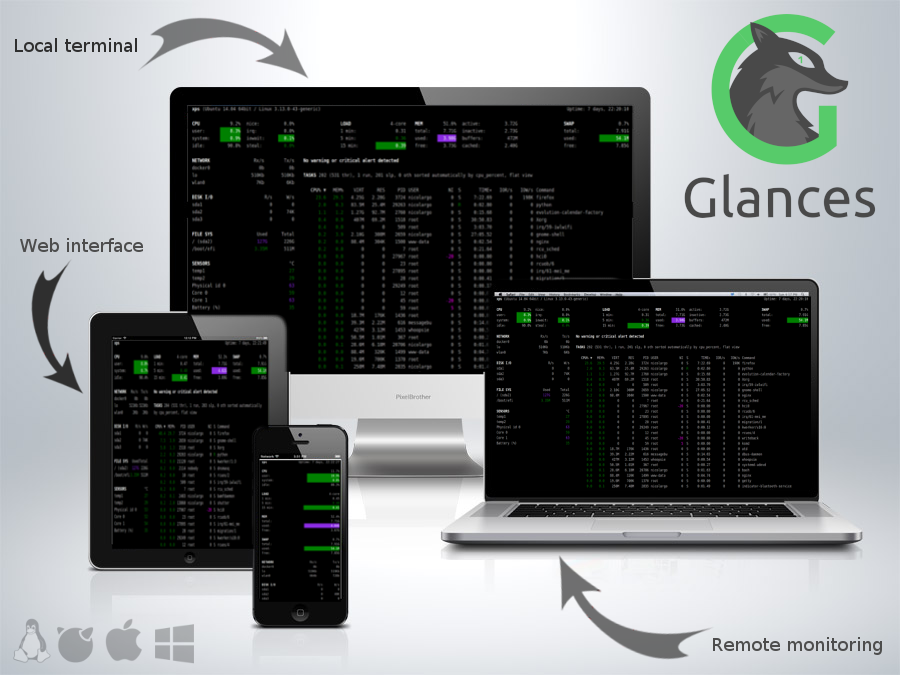
In client/server mode, remote monitoring could be done via terminal, Web interface or API (XML-RPC and RESTful). Stats can also be exported to files or external time/value databases, CSV or direct output to STDOUT.
Glances is written in Python and uses libraries to grab information from your system. It is based on an open architecture where developers can add new plugins or exports modules.
Requirements
python>=3.8(use Glances 3.4.x for lower Python version)psutil>=5.3.0(better with latest version)defusedxml(in order to monkey patch xmlrpc)ujson(an optimized alternative to the standard json module)
Note for Python 2 users
Glances version 4 or higher do not support Python 2 (and Python 3 < 3.8). Please uses Glances version 3.4.x if you need Python 2 support.
Optional dependencies:
batinfo(for battery monitoring)bernhard(for the Riemann export module)cassandra-driver(for the Cassandra export module)chevron(for the action script feature)docker(for the Containers Docker monitoring support)elasticsearch(for the Elastic Search export module)FastAPIandUvicorn(for Web server mode)graphitesender(For the Graphite export module)hddtemp(for HDD temperature monitoring support) [Linux-only]influxdb(for the InfluxDB version 1 export module)influxdb-client(for the InfluxDB version 2 export module)jinja2(for templating, used under the hood by FastAPI)kafka-python(for the Kafka export module)netifaces(for the IP plugin)orjson(fast JSON library, used under the hood by FastAPI)py3nvml(for the GPU plugin)pycouchdb(for the CouchDB export module)pika(for the RabbitMQ/ActiveMQ export module)podman(for the Containers Podman monitoring support)potsdb(for the OpenTSDB export module)prometheus_client(for the Prometheus export module)py-cpuinfo(for the Quicklook CPU info module)pygal(for the graph export module)pymdstat(for RAID support) [Linux-only]pymongo(for the MongoDB export module)pysnmp(for SNMP support)pySMART.smartx(for HDD Smart support) [Linux-only]pyzmq(for the ZeroMQ export module)requests(for the Ports, Cloud plugins and RESTful export module)sparklines(for the Quick Plugin sparklines option)statsd(for the StatsD export module)wifi(for the wifi plugin) [Linux-only]zeroconf(for the autodiscover mode)
Installation
There are several methods to test/install Glances on your system. Choose your weapon!
PyPI: The standard way
Glances is on PyPI. By using PyPI, you will be using the latest
stable version.
To install Glances, simply use pip:
.. code-block:: console
pip install --user glancesNote: Python headers are required to install psutil_, a Glances
dependency. For example, on Debian/Ubuntu the simplest is apt install python3-psutil or alternatively need to install first
the python-dev package and gcc (python-devel on Fedora/CentOS/RHEL).
For Windows, just install psutil from the binary installation file.
Note 2 (for the Wifi plugin): If you want to use the Wifi plugin, you need to install the wireless-tools package on your system.
By default, Glances is installed without the Web interface dependencies. To install it, use the following command:
.. code-block:: console
pip install --user 'glances[web]'For a full installation (with all features):
.. code-block:: console
pip install --user 'glances[all]'To upgrade Glances to the latest version:
.. code-block:: console
pip install --user --upgrade glancesThe current develop branch is published to the test.pypi.org package index. If you want to test the develop version (could be instable), enter:
.. code-block:: console
pip install --user -i https://test.pypi.org/simple/ GlancesGlances Auto Install script: the easy way
To install both dependencies and the latest Glances production ready version (aka master branch), just enter the following command line:
.. code-block:: console
curl -L https://bit.ly/glances | /bin/bashor
.. code-block:: console
wget -O- https://bit.ly/glances | /bin/bashNote: This is only supported on some GNU/Linux distributions and Mac OS X.
If you want to support other distributions, please contribute to glancesautoinstall_.
Docker: the fun way
Glances Docker images are availables. You can use it to monitor your server and all your containers !
Get the Glances container:
.. code-block:: console
docker pull nicolargo/glances:latest-fullThe following tags are availables:
- latest-full for a full Alpine Glances image (latest release) with all dependencies
- latest for a basic Alpine Glances (latest release) version with minimal dependencies (FastAPI and Docker)
- dev for a basic Alpine Glances image (based on development branch) with all dependencies (Warning: may be instable)
- ubuntu-latest-full for a full Ubuntu Glances image (latest release) with all dependencies
- ubuntu-latest for a basic Ubuntu Glances (latest release) version with minimal dependencies (FastAPI and Docker)
- ubuntu-dev for a basic Ubuntu Glances image (based on development branch) with all dependencies (Warning: may be instable)
Run last version of Glances container in console mode:
.. code-block:: console
docker run --rm -e TZ="${TZ}" -v /var/run/docker.sock:/var/run/docker.sock:ro -v /run/user/1000/podman/podman.sock:/run/user/1000/podman/podman.sock:ro --pid host --network host -it nicolargo/glances:latest-fullBy default, the /etc/glances/glances.conf file is used (based on docker-compose/glances.conf).
Additionally, if you want to use your own glances.conf file, you can create your own Dockerfile:
.. code-block:: console
FROM nicolargo/glances:latestCOPY glances.conf /root/.config/glances/glances.confCMD python -m glances -C /root/.config/glances/glances.conf $GLANCES_OPTAlternatively, you can specify something along the same lines with
docker run options (notice the GLANCES_OPT environment
variable setting parameters for the glances startup command):
.. code-block:: console
docker run -e TZ="${TZ}" -v `pwd`/glances.conf:/root/.config/glances/glances.conf -v /var/run/docker.sock:/var/run/docker.sock:ro -v /run/user/1000/podman/podman.sock:/run/user/1000/podman/podman.sock:ro --pid host -e GLANCES_OPT="-C /root/.config/glances/glances.conf" -it nicolargo/glances:latest-fullWhere `pwd`/glances.conf is a local directory containing your glances.conf file.
Run the container in Web server mode:
.. code-block:: console
docker run -d --restart="always" -p 61208-61209:61208-61209 -e TZ="${TZ}" -e GLANCES_OPT="-w" -v /var/run/docker.sock:/var/run/docker.sock:ro -v /run/user/1000/podman/podman.sock:/run/user/1000/podman/podman.sock:ro --pid host nicolargo/glances:latest-fullFor a full list of options, see the Glances Docker_ documentation page.
GNU/Linux
Glances is available on many Linux distributions, so you should be
able to install it using your favorite package manager. Be aware that
when you use this method the operating system package_ for Glances
may not be the latest version and only basics plugins are enabled.
Note: The Debian package (and all other Debian-based distributions) do
not include anymore the JS statics files used by the Web interface
(see issue2021). If you want to add it to your Glances installation,
follow the instructions: issue2021comment.
FreeBSD
To install the binary package:
.. code-block:: console
# pkg install py38-glancesTo install Glances from ports:
.. code-block:: console
# cd /usr/ports/sysutils/py-glances/# make install cleanmacOS
If you do not want to use the glancesautoinstall script, follow this procedure.
macOS users can install Glances using Homebrew or MacPorts.
Homebrew
.. code-block:: console
    $ brew install glances
MacPorts
.. code-block:: console
$ sudo port install glancesWindows
Install Python_ for Windows (Python 3.4+ ship with pip) and
then run the following command:
.. code-block:: console
$ pip install glancesAndroid
You need a rooted device and the Termux_ application (available on the
Google Play Store).
Start Termux on your device and enter:
.. code-block:: console
$ apt update$ apt upgrade$ apt install clang python$ pip install fastapi uvicorn orjson jinja2$ pip install glancesAnd start Glances:
.. code-block:: console
$ glancesYou can also run Glances in server mode (-s or -w) in order to remotely monitor your Android device.
Source
To install Glances from source:
.. code-block:: console
$ wget https://github.com/nicolargo/glances/archive/vX.Y.tar.gz -O - | tar xz$ cd glances-*# python setup.py installNote: Python headers are required to install psutil.
Chef
An awesome Chef cookbook is available to monitor your infrastructure:
https://supermarket.chef.io/cookbooks/glances (thanks to Antoine Rouyer)
Puppet
You can install Glances using Puppet: https://github.com/rverchere/puppet-glances
Ansible
A Glances Ansible role is available: https://galaxy.ansible.com/zaxos/glances-ansible-role/
Usage
For the standalone mode, just run:
.. code-block:: console
$ glancesFor the Web server mode, run:
.. code-block:: console
$ glances -wand enter the URL http://<ip>:61208 in your favorite web browser.
For the client/server mode, run:
.. code-block:: console
$ glances -son the server side and run:
.. code-block:: console
$ glances -c <ip>on the client one.
You can also detect and display all Glances servers available on your network or defined in the configuration file:
.. code-block:: console
$ glances --browserYou can also display raw stats on stdout:
.. code-block:: console
$ glances --stdout cpu.user,mem.used,loadcpu.user: 30.7mem.used: 3278204928load: {'cpucore': 4, 'min1': 0.21, 'min5': 0.4, 'min15': 0.27}cpu.user: 3.4mem.used: 3275251712load: {'cpucore': 4, 'min1': 0.19, 'min5': 0.39, 'min15': 0.27}...or in a CSV format thanks to the stdout-csv option:
.. code-block:: console
$ glances --stdout-csv now,cpu.user,mem.used,loadnow,cpu.user,mem.used,load.cpucore,load.min1,load.min5,load.min152018-12-08 22:04:20 CEST,7.3,5948149760,4,1.04,0.99,1.042018-12-08 22:04:23 CEST,5.4,5949136896,4,1.04,0.99,1.04...or in a JSON format thanks to the stdout-json option (attribute not supported in this mode in order to have a real JSON object in output):
.. code-block:: console
$ glances --stdout-json cpu,memcpu: {"total": 29.0, "user": 24.7, "nice": 0.0, "system": 3.8, "idle": 71.4, "iowait": 0.0, "irq": 0.0, "softirq": 0.0, "steal": 0.0, "guest": 0.0, "guest_nice": 0.0, "time_since_update": 1, "cpucore": 4, "ctx_switches": 0, "interrupts": 0, "soft_interrupts": 0, "syscalls": 0}mem: {"total": 7837949952, "available": 2919079936, "percent": 62.8, "used": 4918870016, "free": 2919079936, "active": 2841214976, "inactive": 3340550144, "buffers": 546799616, "cached": 3068141568, "shared": 788156416}...