
Audiobookshelf
5.3k 367What is Audiobookshelf ?
Audiobookshelf is a self-hosted audiobook and podcast server.
Audiobookshelf Features
- Fully open-source, including the android & iOS app (in beta)
- Stream all audio formats on the fly
- Search and add podcasts to download episodes w/ auto-download
- Multi-user support w/ custom permissions
- Keeps progress per user and syncs across devices
- Auto-detects library updates, no need to re-scan
- Upload books and podcasts w/ bulk upload drag and drop folders
- Backup your metadata + automated daily backups
- Progressive Web App (PWA)
- Chromecast support on the web app and android app
- Fetch metadata and cover art from several sources
- Chapter editor and chapter lookup (using Audnexus API)
- Merge your audio files into a single m4b
- Embed metadata and cover image into your audio files (using Tone)
- Basic ebook support and ereader
- Epub, pdf, cbr, cbz
- Send ebook to device (i.e. Kindle)
- Open RSS feeds for podcasts and audiobooks
Is there a feature you are looking for? Suggest it
Android App (beta)
Try it out on the Google Play Store
iOS App (beta)
Beta is currently full. Apple has a hard limit of 10k beta testers. Updates will be posted in Discord/Matrix.
Using Test Flight: https://testflight.apple.com/join/wiic7QIW (beta is full)
Build your own tools & clients
Check out the API documentation

Organizing your audiobooks
Directory structure and folder names are important to Audiobookshelf!
See documentation for supported directory structure, folder naming conventions, and audio file metadata usage.
Install Audiobookshelf
See install docs
Reverse Proxy Set Up
Important! Audiobookshelf requires a websocket connection.
Note: Subfolder paths (e.g. /audiobooks) are not supported yet. See issue
NGINX Proxy Manager
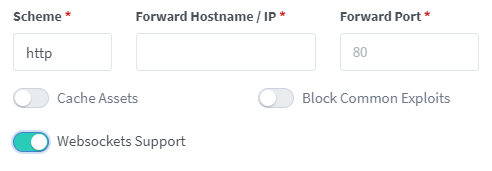
Toggle websockets support.
NGINX Reverse Proxy
Add this to the site config file on your nginx server after you have changed the relevant parts in the <> brackets, and inserted your certificate paths.
server{        listen 443 ssl;        server_name <sub>.<domain>.<tld>;
        access_log /var/log/nginx/audiobookshelf.access.log;        error_log /var/log/nginx/audiobookshelf.error.log;
        ssl_certificate      /path/to/certificate;        ssl_certificate_key  /path/to/key;
        location / {                     proxy_set_header X-Forwarded-For    $proxy_add_x_forwarded_for;                     proxy_set_header  X-Forwarded-Proto $scheme;                     proxy_set_header  Host              $host;                     proxy_set_header Upgrade            $http_upgrade;                     proxy_set_header Connection         "upgrade";
                     proxy_http_version                  1.1;
                     proxy_pass                          http://<URL_to_forward_to>;                     proxy_redirect                      http:// https://;                   }}
Apache Reverse Proxy
Add this to the site config file on your Apache server after you have changed the relevant parts in the <> brackets, and inserted your certificate paths.
For this to work you must enable at least the following mods using a2enmod:
sslproxyproxy_httpproxy_balancerproxy_wstunnelrewrite
<IfModule mod_ssl.c><VirtualHost *:443>    ServerName <sub>.<domain>.<tld>
    ErrorLog ${APACHE_LOG_DIR}/error.log    CustomLog ${APACHE_LOG_DIR}/access.log combined
    ProxyPreserveHost On    ProxyPass / http://localhost:<audiobookshelf_port>/    RewriteEngine on    RewriteCond %{HTTP:Upgrade} websocket [NC]    RewriteCond %{HTTP:Connection} upgrade [NC]    RewriteRule ^/?(.*) "ws://localhost:<audiobookshelf_port>/$1" [P,L]
    # unless you're doing something special this should be generated by a    # tool like certbot by let's encrypt    SSLCertificateFile /path/to/cert/file    SSLCertificateKeyFile /path/to/key/file</VirtualHost></IfModule>
Some SSL certificates like those signed by Let’s Encrypt require ACME validation. To allow Let’s Encrypt to write and confirm
the ACME challenge, edit your VirtualHost definition to prevent proxying traffic that queries /.well-known and instead
serve that directly:
<VirtualHost *:443>    # ...
    # create the directory structure  /.well-known/acme-challenges    # within DocumentRoot and give the HTTP user recursive write    # access to it.    DocumentRoot /path/to/local/directory
    ProxyPreserveHost On    ProxyPass /.well-known !    ProxyPass / http://localhost:<audiobookshelf_port>/
    # ...</VirtualHost>
SWAG Reverse Proxy
See LinuxServer.io config sample
Synology NAS Reverse Proxy Setup (DSM 7+/Quickconnect)
-
Open Control Panel
- Navigate to
Login Portal > Advanced.
- Navigate to
-
General Tab
- Click
Reverse Proxy>Create.
Setting Value Reverse Proxy Name audiobookshelf - Click
-
Source Configuration
Setting Value Protocol HTTPS Hostname <sub>.<quickconnectdomain>.synology.mePort 443 Access Control Profile Leave as is - Example Hostname:
audiobookshelf.mydomain.synology.me
- Example Hostname:
-
Destination Configuration
Setting Value Protocol HTTP Hostname Your NAS IP Port 13378 -
Custom Header Tab
- Go to
Create > Websocket. - Configure Headers (leave as is):
Header Name Value Upgrade $http_upgradeConnection $connection_upgrade - Go to
-
Advanced Settings Tab
- Leave as is.
Traefik Reverse Proxy
Middleware relating to CORS will cause the app to report Unknown Error when logging in. To prevent this don’t apply any of the following headers to the router for this site:
- accessControlAllowMethods
- accessControlAllowOriginList
- accessControlMaxAge
From @Dondochaka and @BeastleeUK
Example Caddyfile - Caddy Reverse Proxy
subdomain.domain.com { encode gzip zstd reverse_proxy <LOCAL_IP>:<PORT>}HAProxy
Below is a generic HAProxy config, using audiobookshelf.YOUR_DOMAIN.COM.
To use http2, ssl is needed.
global    # ... (your global settings go here)
defaults    mode http    # ... (your default settings go here)
frontend my_frontend    # Bind to port 443, enable SSL, and specify the certificate list file    bind :443 name :443 ssl crt-list /path/to/cert.crt_list alpn h2,http/1.1    mode http
    # Define an ACL for subdomains starting with "audiobookshelf"    acl is_audiobookshelf hdr_beg(host) -i audiobookshelf
    # Use the ACL to route traffic to audiobookshelf_backend if the condition is met,    # otherwise, use the default_backend    use_backend audiobookshelf_backend if is_audiobookshelf    default_backend default_backend
backend audiobookshelf_backend    mode http    # ... (backend settings for audiobookshelf go here)
    # Define the server for the audiobookshelf backend    server audiobookshelf_server 127.0.0.99:13378
backend default_backend    mode http    # ... (default backend settings go here)
    # Define the server for the default backend    server default_server 127.0.0.123:8081
pfSense and HAProxy
For pfSense the inputs are graphical, and Health checking is enabled.
Frontend, Default backend, access control lists and actions
Access Control lists
| Name | Expression | CS | Not | Value |
|---|---|---|---|---|
| audiobookshelf | Host starts with: | audiobookshelf. |
Actions
The condition acl names needs to match the name above audiobookshelf.
| Action | Parameters | Condition acl names |
|---|---|---|
Use Backend | audiobookshelf | audiobookshelf |
Backend
The Name needs to match the Parameters above audiobookshelf.
| Name | audiobookshelf |
|---|
Server list:
| Name | Expression | CS | Not | Value |
|---|---|---|---|---|
| audiobookshelf | Host starts with: | audiobookshelf. |
Health checking:
Health checking is enabled by default. Http check method of OPTIONS is not supported on Audiobookshelf.
If Health check fails, data will not be forwared.
Need to do one of following:
- To disable: Change
Health check methodtonone. - To make Health checking function: Change
Http check methodtoHEADorGET.